Restricting MCP connectors to read-only access
What allowing only the read tools of an MCP connector gets you, checked on 19 servers including Jira, Slack, Notion, Stripe and Grafana. 18 list write tools by default. Read-only grants refused the two writes I tried. A Grafana tool labeled read-only ran an INSERT with write tools disabled, given an Editor token and a database user that could write.
on this page
Say you’re building a platform where agents read Jira. You could write a Jira client and a set of tools for it. I’d rather not, and most setups I’ve seen don’t: you connect the existing MCP connector, Atlassian’s hosted one or a community server, turn on whatever read-only settings it has, and allow only the tools that read.
That doesn’t always make the integration read-only. The allowlist decides which tools the agent can call. The grant you approved decides what a call can do. And in two of the 19 servers I checked, a tool labeled read-only can write. Grafana’s ran an INSERT for me with both of the server’s read-only flags on, given an Editor token and a database user that could write.
I build read-only MCP servers, so I have a stake in this. On a platform, nobody watches the agent’s tool calls or clicks “allow” before one runs. The allowlist, the server’s read-only mode and the grant are the whole defense against a write through the connector, so I checked what each of them holds.
What I checked
19 maintained MCP servers, vendor and community, local and hosted, between 2026-11-03 and 2026-11-12. For each one I listed the tools in its default configuration and with its read-only mode on, using dummy credentials. Five hosted servers (Notion, Linear, Slack, Stripe, Atlassian) I connected through their consent pages on test accounts. Then I tried writes: one each under a read-only grant on Stripe and Atlassian, and a set against local stacks for Grafana, MongoDB, ClickHouse, Octopus Deploy, TeamCity and Supabase. The full table, with versions, is further down.
Allowing only the read tools
The usual way to restrict a connector is an allowlist: the OpenAI Agents SDK, for one, takes a static filter with the tool names you allow. Some platforms filter on the tool’s own label instead: MCP lets a server mark a tool readOnlyHint: true, and Cursor’s unattended agents, per Cursor staff, use only tools marked that way.
Either way you’re trusting the server to have put the right tools under the right names and labels. In most of the servers I checked, it has; in the ones below, a name or a label lets a write through.
A Grafana image tool that runs queries
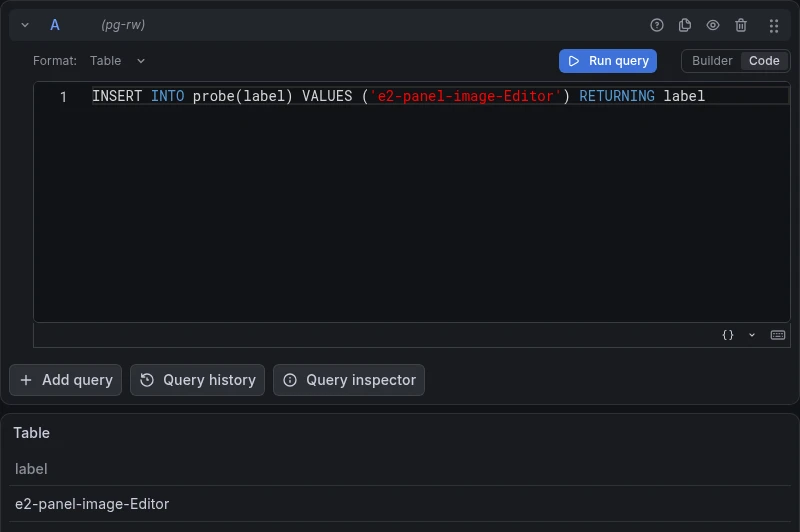
get_panel_image renders a dashboard panel or an Explore view as an image, and it’s labeled read-only. In Explore mode it takes a datasource and a raw query, and Grafana runs that query to draw the result. I ran mcp-grafana v2.2.0 with both of its restricting flags, --disable-write and --disable-query, against Grafana OSS 13.3.1 with the image renderer and a Postgres datasource whose database user was allowed to insert. The two flags removed the SQL query tools. get_panel_image stayed. I called it with an Editor service-account token and this query:
INSERT INTO probe(label) VALUES ('e2-panel-image-Editor') RETURNING labelThe row is in the table. This is the image the tool returned to the agent, and it looks exactly like a successful read:
MongoDB’s aggregate
aggregate and aggregate-db are labeled read-only, and most pipelines only read. A $out stage replaces a whole collection; $merge modifies one. I ran mongodb-mcp-server 3.2.1 in its default configuration against a local MongoDB 8.0, connected as a user that could write, and called aggregate with a $out into a collection that held two documents. The tool answered “The aggregation pipeline executed successfully.” Both documents were gone, replaced by the pipeline’s output. $merge overwrote an existing document the same way, and aggregate-db did both.
The server has a guard for this. If the client supports elicitation, it asks first: “This aggregation contains a $out stage that will replace the entire contents of e2.target […] Proceed?” The MCP Inspector’s command-line client doesn’t support elicitation, so it never saw the question. Neither did a Python client (MCP SDK 2.3.0, over stdio) that does support it but connected with the newer 2026-07-28 protocol, the SDK’s default: no prompt, and the collection was replaced. Over the older handshake the same client got the prompt, and declining stopped the write. Read-only mode refused both stages before they reached MongoDB, and so did a database user with only the read role.
Grafana and MongoDB have the same cause. A label belongs to the tool, and what these tools do depends on their arguments.
One tool for reads and writes
Sentry’s MCP server sends most operations, creates and deletes included, through execute_sentry_tool. Octopus Deploy’s execute takes the HTTP method as an argument, GET through DELETE. Cloudflare’s API server has an execute that runs agent-written code against roughly 2,500 endpoints. All three are labeled destructive, correctly, and an allowlist can’t take their reads without their writes. Stripe and Atlassian split the two into separate read and write gateways.
Filters checked only when listing
In July, Manifold Security reported that the community mcp-atlassian server applied its ENABLED_TOOLS allowlist when listing tools but not when calling them: “Call tools/call with a restricted tool’s name and it executes anyway.” Fixed in 0.22.0. It matters when the allowlist lives in the server rather than in your client.
There’s a vocabulary problem too. Atlassian’s executeWrite describes itself as “creates or updates data, non-destructive”, and editJiraIssue (“Every field is set, not appended”) carries the same destructiveHint: false. To the vendor, destructive means delete. The MCP spec says non-destructive means the tool “performs only additive updates”. An allowlist of read tools never admits these two, since they’re plainly writes. A client that skips prompts for non-destructive tools does. Codex’s auto mode, for instance, runs a tool marked non-destructive and closed-world without asking, and both of these are marked that way.
Connecting with a read-only grant
Hosted connectors start with a consent page, and that page is the first real answer to “is this read-only?” The five I connected each answered it differently:
| Connector | What the consent page offers | Tools listed, full grant → read grant |
|---|---|---|
| Notion | a workspace to pick; no read-only option | 71, of which 34 write |
| Linear | a separate read-only endpoint, or a read scope | 70 → 38 |
| Slack | whatever scopes the app requests; accept or cancel | 27 → 14 |
| Atlassian | Read, Write and Search groups, Write preselected | 26 → 19, executeWrite still listed |
| Stripe | Read and Write presets, Write preselected | 11 → 11 (2026-11-12) |
Two of the five preselect Write. Notion has no read-only connection at all; the assistant can change any page you can, unless you block its write tools.
Slack surprised me. Its grants add up per app: a request for read scopes returned a token that still carried the write scopes from an earlier install, until I revoked the app’s tokens.
Going by Stripe’s row, the Read preset changes nothing. The call says otherwise. I connected with the Read preset and asked stripe_api_write to create a customer in the sandbox. Stripe answered with HTTP 403 insufficient_scope: “Your API key does not have the required permissions for ‘PostCustomers’.” Atlassian, with Write unticked, refused a createJiraIssue sent through executeWrite the same way: “Additional permissions required: write:jira:agent-interface.” Nothing was created on either account. That’s one write per server: the grant held where I tested it, while the tool list still showed the write tool.
A 403 with insufficient_scope is how the spec asks for more access, and the MCP Python SDK in my test script answered it by opening a second consent page on its own. Atlassian’s challenge names the missing write scope, so clicking through grants write. Stripe’s asks for mcp, the scope the grant already had, because its permissions sit behind the grant rather than in OAuth scopes; the second page looked like the first, and choosing Read again failed again.
A real client behaved differently. Claude Code, connected to Atlassian with Write unticked and asked to create an issue, never tried. Atlassian’s operation search returned only reads, and Claude told me the connection was read-only and how to re-authorize it with write access. Either way, a read-only connection sits one consent page away from read-write. On a platform, someone has to decide who may approve that page.
Read-only mode in the server
12 of the 19 servers have a read-only mode of some kind. It’s off by default in all but two. ClickHouse’s server sends each query with the database setting readonly=1 unless you enable writes, and ClickHouse refused every write I sent, including queries that tried to switch the setting off. JetBrains’ built-in TeamCity server starts in a safe mode where the only write is queuing a personal build. Most modes remove the write tools from the list (--read-only in GitHub and Supabase, READ_ONLY_MODE in mcp-atlassian). A few keep the tool and refuse the call: under --read-only, Octopus Deploy’s execute stays listed, and the server refused every POST, PUT, PATCH and DELETE before it reached Octopus. Some lean on a database user. On Supabase’s local stack, read-only mode ran execute_sql as supabase_read_only_user, and an INSERT failed even after the query switched its transaction to read-write.
Grafana’s flags removed every tool that was obviously a query and kept the one that draws pictures of queries.
If a person or a client is in the loop, labels matter in a second way. I ran a stub server with five no-op tools that differed only in their labels through VS Code 1.145.2, Codex 0.167.0 and Claude Code 2.1.321. All three ran the tool marked read-only without asking (Claude Code in plan mode). Codex also ran the one marked non-destructive and closed-world. With full access and approval set to “never”, which is how you’d run Codex with nobody watching, all five ran.
Read-only support in 19 MCP servers
Checked 2026-11-03 to 2026-11-12 with dummy credentials (local servers) or test accounts (hosted). Tool counts are for the default configuration and change between releases. “(tested)” in the credential column means a write under that credential was refused; the other cells are what the vendor documents. Left out: a community TeamCity server (I maintain a competing one), the archived Postgres reference server, two deprecated Cloudflare servers, Notion’s unmaintained local server, and Octopus Deploy’s hosted server, which needs an instance. Not tested: ChatGPT, Claude custom connectors, Cursor, paid plans.
| Server | Version | Write tools by default | Read-only mode | Read-only grant or credential | Tool list follows the grant | Labeled read-only, can write |
|---|---|---|---|---|---|---|
| GitHub (official) | 2.1.0 | 19 of 46 | --read-only (46 → 27) | fine-grained token, read permissions | classic token and OAuth only | none found |
| Grafana (official) | 2.2.0 | 20 of 80 | --disable-write (80 → 63) | Viewer service account (tested) | no | get_panel_image (tested) |
| MongoDB (official) | 3.2.1 | 11 of 27 | --readOnly (27 → 18) | database user with read role (tested) | no | aggregate, aggregate-db (tested) |
| ClickHouse (official) | 0.7.0 | none, writes off unless enabled | database readonly=1 | SELECT-only user (tested) | no | none found, no labels |
| Kubernetes (containers) | 0.1.1 | 6 of 20 | read_only config key (20 → 14) | RBAC view role | no | none found |
| Slack (korotovsky) | 1.3.0 | 9 of 18 | none | read-only Slack scopes | no | none found |
| Slack (official, hosted) | 1.0.0 | 13 of 27 | none | the app’s user-token scopes | yes (27 → 14) | none found |
| Notion (hosted) | 1.2.0 | 34 of 71 | none | none | one documented case | none found |
| Linear (hosted) | 1.0.2 | 31 of 70 | /mcp/readonly endpoint (70 → 38) | read scope | yes (70 → 38) | none found |
| Sentry (official) | 0.42.0 | 3 of 9 | --skills=inspect (9 → 7) | read scopes | no | none found |
| Stripe (hosted) | 1.0.0 | 3 of 11 | none | Read preset (tested) | no (11 → 11) | none found |
| Atlassian Rovo (hosted) | 1.0.0 | 9 of 26 | none in the server; an org admin can turn writes off | Write unticked on the consent page (tested) | partly (26 → 19) | none found |
| mcp-atlassian (community) | 0.23.1 | 40 of 98 | READ_ONLY_MODE (98 → 58) | read-only token or OAuth scopes | no | none found |
| Supabase (official) | 0.15.0 | 13 of 31 | --read-only (31 → 19) | project-scoped token | no | none found |
| Cloudflare API (official) | main, 2026-11 | 1 of 4 | none | read-only API token | no | none found |
| Octopus Deploy (npm) | 2.3.2 | 5 of 30 | --read-only (30 → 26) | API key with a read-only role (tested) | no | none found |
| Filesystem (reference) | 2.1.0 | 4 of 14 | none, directory allow-list | OS permissions, read-only mounts | n/a | none found |
| Postgres (crystaldba) | 0.3.0 | 2 of 9 | --access-mode=restricted | SELECT-only role | no | none found, no labels |
| TeamCity (JetBrains, built-in) | 2026.2.2 | one limited write in safe mode | safe mode is the default | Read-only token preset (tested) | no | none found, no labels |
My two servers, for TeamCity and Akamai, have no write code, and every tool is labeled read-only (TeamCity 1.0.1, Akamai 0.2.1). That label is my claim about my own code; nothing in MCP checks it.
What I check before connecting an MCP connector
| Question | Where to look |
|---|---|
| What can the account I’m connecting change? | The consent page or token settings. Untick Write, pick the read endpoint, or use a key with read permissions. If the connector has no read-only grant (Notion), the allowlist is all you have. |
| Who can approve more access later? | The platform’s connector settings. A refused write turns into a request for more scope. |
| Which tools do I allow? | List them by name, not by label. Look hard at tools that render, export, query or “execute” anything. |
| Does the server have a read-only mode, and what does it leave? | Its README and its tool list with the mode on. |
Of these, only the credential is enforced by the system that holds the data. And read-only stops writes through those tools; anything the agent can read, it can still pass on.
The Grafana test had a second half. I made the same call with a Viewer token. Nothing ran: Grafana sends a Viewer away from Explore, so the query never reached Postgres. The tool still reported success, and returned a picture of Grafana’s home page. Nothing in the response said the query never ran.